
A quick blog entry here 🙂
Just the other day I was looking into why don’t my Page Layouts show up on the Create New Page _layouts/CreatePage.aspx. I went through my routine of checking things out one step at a time. My to-do list included the following items:
1. First look at my custom page layouts and see if there is some thing wrong with them
2. Trace the process by which I was creating these layouts
3. Copy and Paste OOB Page Layout into my own and upload back into the gallery
4. Create Page Layout in SPD
5. Review my custom Page content types
All of the above didn’t really help. So I figured that, there is really nothing wrong with the layouts themselves. There has to be something somewhere I am missing though. And all of a sudden, after a good cup of coffee and some ice-cream (no, I wish), I figured I should check out my Site Collection Settings. And here we go. So what can I share with you? I would say, don’t forget about the Page Layout and Site Template Settings page found here /_Layouts/AreaTemplateSettings.aspx. This application page can help you with further allowing or disallowing the use of your custom Page Layouts or Site Templates down the stream.
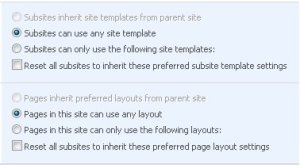
As it turns out that I rarely use or visit this page. So in summary, for me, this was a very good "reminder". Hopefully this helps someone else out there.
Have a good day!

 Johnny Harbieh
Leave a comment